Phone system for medical practices: VoIP, IVR or AI receptionist? How to choose and be ready for 2027

Choosing a phone system for medical practices today means deciding who answers when the front desk cannot. VoIP, IVR and an AI receptionist are not three alternatives in a row: they do different jobs and often work together. This guide covers what each one does, when it is enough and when it is not, and how to choose for your facility.
In short. The phone system, VoIP or traditional, carries calls to lines and extensions: an AI receptionist does not replace it, it sits on top of it. An IVR routes calls with a keypad menu and works for simple choices, but patients call with two requests at a time on average. An AI receptionist understands the request, books when the practice software is integrated and hands over to a person when needed. Start from how many calls you miss, when and why, not from the technology.
Table of Contents
What is the difference between a VoIP phone system, an IVR and an AI receptionist?
How do you choose a phone system for medical practices by facility type?
Why is the phone the front desk's first problem?
Because almost everything comes through the phone, and the phone rings exactly when the front desk is already busy. In the 2,452 conversations we analyzed in September 2026, 90.8% came in by phone.
Monday, 8:30 am. At the desk, one patient is waiting to pay and another is asking where blood tests are done. The phone rings. Whoever is at the front desk has to choose: answer and keep the person in front of them waiting, or let it ring. At one o'clock the desk closes for lunch and calls go to voicemail. In the afternoon someone will have to call back the patient who wanted to cancel, the one waiting for a report, the one who left an unclear message.
It is not a matter of effort. In healthcare, calls arrive in peaks, for example between 8 and 10 in the morning and on Monday mornings, and staffing for the peaks is not realistic. Front-desk staff also handle check-in, payments and paperwork, and they are interrupted all the time.
What is inside the calls matters too. This is what we found in conversations handled by Virtual Reception in several Italian healthcare facilities, from 1 to 22 September 2026:
booking appears in 68.3% of conversations, but it is the only request in just 14.6%;
each conversation contains 2.0 requests on average, and 19 request types produced 311 different combinations;
a request to speak to a staff member appears in 30.4% of conversations, but it is the only request in just 6.3%: in 79.2% of cases it comes with a concrete need, such as a booking or a change;
almost one conversation in ten, 9.5%, is about moving or cancelling an appointment.
The full analysis, with its methodology, is in what patients really ask when they contact a facility. For the choice of a phone system, these numbers say one simple thing: patients call with compound requests, and a system that forces them to pick a single option sends them to a staff member anyway.
If overall volume is part of the problem, callbacks and online booking are other levers: see how to reduce wait times and call center traffic.
What is the difference between a VoIP phone system, an IVR and an AI receptionist?
They work at different levels. The phone system is the infrastructure that carries calls to lines and extensions. The IVR and the AI receptionist are two ways of answering before a person steps in: the first with a menu, the second with a conversation.
The VoIP phone system, cloud or on-premise
The phone system, or PBX, receives calls on the facility's number and distributes them across lines and extensions. It can be analog or VoIP. With VoIP, voice travels over the internet instead of the traditional phone line.
A VoIP phone system can be in the cloud, meaning the provider runs it on external servers, or on-premise, meaning it is installed at the facility. It connects to the telephone carrier through a SIP trunk: an internet connection that carries several calls at the same time.
What it does. It distributes calls across extensions and applies time rules: during opening hours calls go to the front desk, after hours to a message or another number. With call forwarding it passes a call to another number or extension, for example when nobody answers. It manages the queue, meaning the waiting calls lined up until someone is free. With ACD, automatic call distribution, it assigns each call to a free staff member according to rules set by the facility.
What it does not do. It does not answer in place of people. If everyone is on the phone, the call stays in the queue or goes to voicemail. When the front desk is closed, the most a patient can do is leave a message.
When it is enough. If you answer almost every call, peaks are manageable and few people call after hours, a good phone system with queues and time rules may be all you need.
The IVR, the keypad menu
An IVR (Interactive Voice Response) is the menu-based auto attendant: "for bookings press 1, for reports press 2". It routes the call based on the key pressed and can play recorded messages, such as opening hours. It can be a feature of the phone system or a separate service.
When it makes sense. When the choices are few and clear-cut. For example, a facility with separate offices, such as bookings, administration and report collection, that wants to send each call to the right one. Or a fixed message with blood-test hours.
The limit. A menu forces a single choice. Someone calling to book a visit and ask the price has two requests, and in our analysis that is the norm. A traditional IVR routes but does not book: at the end of the path a staff member is still needed.
The detailed comparison of the two approaches is in IVR or Virtual Reception: pros and cons.
The AI receptionist, which understands and answers
An AI receptionist answers the phone with a synthetic voice and holds a conversation. The patient speaks normally, can interrupt and change subject. The system understands the request, answers with the facility's information and, when the practice software is integrated, books, moves or cancels the appointment.
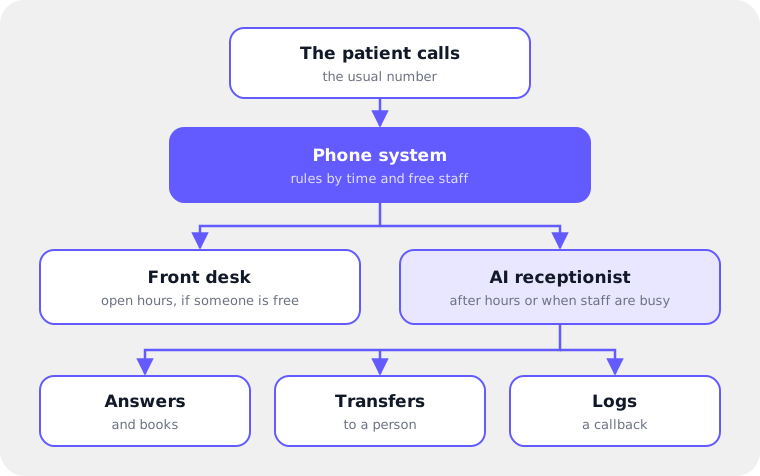
In Run2AI Virtual Reception, the AI receptionist for medical practices connects to the existing phone system and also answers on WhatsApp, website chat and email. During opening hours it transfers the call to a person when the patient asks or when the request needs one. When the facility is closed it logs a callback request with name, number and a summary of the conversation.
What it does not do. It is right to say this plainly:
it does not give medical advice or assess symptoms: if the patient expresses an emergency, it points to the emergency number (118 in Italy) or the emergency room;
it cannot recognize an emergency the patient does not express, just like a staff member;
without integrated practice software it does not book in real time: it collects the request for the front desk;
it answers only with the information the facility has entered, which has to be kept up to date;
in our experience, an estimated 20–30% of requests are so specific that they rightly go to a person.
They are not alternatives: how they work together
In practice the three add up. The phone system, VoIP or traditional, remains the telephone connection. Its rules decide which calls go to people and which go to the AI receptionist, which only sees the calls it receives.
Most facilities start with after-hours calls and overflow calls, meaning those that arrive when everyone is already on the phone. After the running-in period many make the AI receptionist the first point of contact around the clock: staff get only what really needs a person. The path is described on the page about inbound call management with AI.
Routing to an office or a person, which the IVR used to do, can also move to the AI receptionist: the patient says "administration" instead of pressing a key, and the call goes to the right extension, respecting each one's hours.
VoIP, IVR or AI receptionist: how do they compare?
The phone system organizes calls, the IVR routes them, the AI receptionist handles them. The table compares the three options on the criteria that matter for a healthcare facility.
| Criterion | VoIP phone system | IVR | AI receptionist |
|---|---|---|---|
| What it does | Carries calls to lines and extensions, with queues and time rules | Routes with a keypad menu and plays recorded messages | Converses, informs, books when the practice software is integrated, hands over to a person |
| Indicative cost | From about €15/month for basic plans (for example Messagenet, in Italy) up to an average of €50–100/month | Depends on the system: often a feature of the phone system | Subscription plus one-off setup: the quote comes in the first call |
| Setup time | Depends on the provider and the existing installation | Depends on the system and on how complex the menu is | With Virtual Reception, usually 2–3 weeks; 5–6 days in the fastest cases |
| Call peaks | Beyond the number of free staff, calls wait in the queue | Answers everyone, but a staff member is still needed after the menu | Several conversations in parallel, up to the number of phone system lines |
| After hours | Message, voicemail or forwarding | Recorded messages | Information, bookings when integrated, callback requests |
| Bookings | Only through a staff member | No, it routes to whoever books | Yes with integrated practice software; otherwise it collects the request |
| Practice software integration | Not needed to work | Not needed to work | Needed to book in real time; the practice software remains the master system |
| Patient experience | Speaks to a person, if one is free | Chooses among fixed options | Speaks normally and can ask for a person |
| Staff workload | Every call reaches people | Calls arrive pre-sorted, but all must be handled | People get what needs them, plus callback requests |
| Measurability | Depends on the phone system: ask for reports on received and missed calls | Depends on the system: ask for data on menu choices and abandoned calls | Outcome of each conversation by channel, transcripts, unanswered questions |
The VoIP and IVR columns describe typical behavior, which varies from product to product. The AI receptionist column reflects the features of Run2AI Virtual Reception.
How do you choose a phone system for medical practices by facility type?
Start from three questions: how many calls you miss, at what times, and how many of those calls could be closed without a person. The type of facility mostly changes the kind of requests that come in.
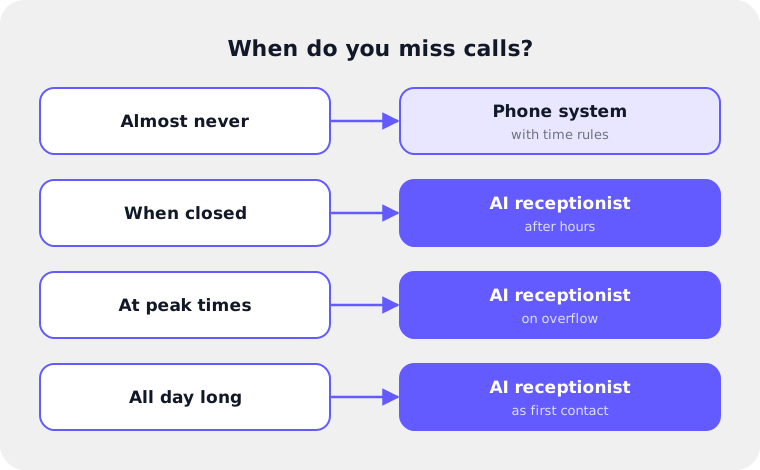
Volume first: three signals
You do not need precise thresholds. Three situations are enough, and anyone working at a front desk recognizes them immediately:
You answer almost everything. Missed calls are few and mostly come when the facility is closed. A phone system with time rules can be enough. An AI receptionist after hours only is an extra to consider, not a necessity.
You miss calls at peak times. Early in the morning and on Mondays the phone rings out or the queue grows. Here overflow matters: an AI receptionist that answers when everyone is busy.
The phone keeps at least one person busy full time. Repetitive requests weigh more than the others. An AI receptionist as first point of contact makes sense, with people on complex requests and on welcoming patients at the desk.
Then the type of facility
| Facility type | What weighs on the phone | Where to start |
|---|---|---|
| Medical practice or general practitioner | Hours, access rules, prescriptions. Often mobile phones only | Simple phone system or forwarding. With mobile phones only, forwarding to the AI receptionist is switched on by hand. The AI receptionist acts as a filter, without promising immediate availability |
| Dental practice | Periodic check-ups, appointment changes | AI receptionist on overflow and after hours; bookings when the practice software is integrated |
| Polyclinic | Many specialties and professionals, compound requests | Time rules on the phone system, AI receptionist on overflow and after hours, then first point of contact |
| Diagnostic center | Exam preparation, public, private and insurance regimes | AI receptionist with preparation instructions; for each service you decide whether it books, collects the request or only gives instructions |
| Multi-site network | Several locations, with different hours and closures | One number per location, or a single number that asks the patient which location; staff assigned to their own locations |
The specialty pages go into detail: AI receptionist for polyclinics, for dental practices and for diagnostic centers.
What should you ask a vendor before choosing?
The right questions are about the number, the phone system, the practice software, the data and what happens when a person is needed. This is the checklist we would use in your place.
Does the number stay the same? With an AI receptionist connected to the phone system, patients call the usual number. If you change carrier or move to a VoIP phone system instead, you have the right to keep your numbers: in Italy, the communications authority AGCOM explains it on its page about contract withdrawal, migration and number portability (in Italian). Ask who handles the request and what happens to calls during the switch.
Does it work with my phone system? Ask how it connects: SIP trunk, dedicated number, call forwarding. And how the transfer to the front desk works without the call bouncing back.
Does it integrate with my practice software? Booking in real time needs a real integration, both read and write. Ask which systems are already integrated and what happens with those that are not. For example: integration with Doctolib Vettore, with Alfadocs and with DBMedica.
Are calls recorded? Ask whether there is an audio recording, for what purpose, for how long and who can listen to it. And what is left for everyday work, such as transcripts.
Does the patient know they are talking to an AI? They must: see the section on rules.
Where is the data and how long is it kept? Ask where it is stored, where the AI models run, who decides the retention period and whether patient conversations are used to train models.
What happens when a person is needed? Ask how the transfer works during opening hours, what happens when the facility is closed and where the front desk finds callback requests.
What can I measure? Ask which outcome you see for each conversation, such as booking, cancellation or callback, whether you get transcripts and whether you see the questions left unanswered.
Who updates the information? Hours, services and preparation instructions change. Ask who updates them and how you find out what is missing.
How Virtual Reception answers
For transparency, this is how Run2AI Virtual Reception answers the same questions:
Number and phone system. Patients call the usual number. With a VoIP phone system the connection is a SIP trunk with a dedicated extension. Transfers to the front desk go through a second "twin" extension, so the call does not come back to the bot. With an analog system, a dedicated number is used with forwarding when nobody answers. It is already connected to phone systems and platforms such as Asterisk, 3CX, Wildix, Yeastar, VirtualPBX and MioDottore Phone, and to carriers and services such as WindTre, Terralink and Twilio.
Practice software. Real-time integration with the systems listed on the integration pages, plus Google Calendar and Outlook Calendar for those who do not use one. The practice software remains the master system.
Recordings. Call audio is kept only for technical checks, for no more than 7 days. For everyday work there is the written transcript of every conversation.
Transparency. The bot always introduces itself as a virtual assistant and refers to the facility's privacy notice.
Data. Stored on Google Cloud Platform in Europe, with AI models running in Europe. The facility decides the retention period. No model is trained on patient conversations.
Updates. Unanswered questions go into "suggested additions", which the facility reviews every two weeks or once a month.
More answers are in the frequently asked questions on phone systems, practice software and privacy.
Which rules apply to privacy and artificial intelligence?
Two European laws: the GDPR for patient data and the AI Act for transparency. Since 2 August 2026, anyone talking to an artificial intelligence system must be told so, unless it is obvious.
This section is a summary, not legal advice. For your facility, refer to your DPO or a legal advisor.
GDPR: health data and the data processor
Data concerning health is a special category of personal data, with stronger protection (Article 9 of Regulation (EU) 2016/679, the GDPR). When a vendor processes data on behalf of the facility, the facility appoints it as data processor with a contract that sets out its tasks and limits (Article 28).
For an AI receptionist this translates into a few concrete things: the privacy notice for patients, the appointment of the vendor, the choice of how long to keep conversations and recordings and of who can access them. It is worth involving the DPO from the start, with the vendor's documentation on the table.
With Virtual Reception, Run2AI signs the data processor appointment and gives the facility's DPO a dedicated notice and the documentation on server compliance.
AI Act: the transparency obligation in Article 50
Regulation (EU) 2024/1689, the AI Act, in Article 50, requires AI systems intended to interact directly with people to be designed so that those people know they are interacting with an AI, unless it is obvious from the context. The obligation applies from 2 August 2026.
Regulation (EU) 2026/1744, known as the Digital Omnibus on AI, postponed the obligations for high-risk systems to 2 December 2027 and 2 August 2028, depending on the category. It did not postpone the obligation to inform people who interact with an AI system.
In practice, an AI receptionist has to introduce itself as one. Virtual Reception always introduces itself as a virtual assistant.
How do you measure whether the new phone system works?
Measure before and after, with the same indicators. Four are enough to start: missed calls, average wait time, abandonment rate and the share of bookings closed without a staff member.
Missed calls: incoming calls nobody answered, including after-hours calls.
Average wait time: how long a patient waits on average before someone answers.
Abandonment rate: calls where the patient hangs up before getting an answer, divided by calls received.
Automated bookings: bookings closed by the AI receptionist, out of all bookings that came in by phone.
The starting point is today's data. Ask whoever manages your phone system for an extract of received and missed calls over the last few weeks, split by time slot. It shows straight away where the problem concentrates: Monday morning, lunch break, evening.
After go-live, add the AI receptionist's data. In Virtual Reception the panel shows the outcome of each conversation, such as bookings, callback requests and cancellations, the calls that ended without a booking and the questions left unanswered. Give the running-in period time: the first weeks are for completing the information with the questions that were missing.
Formulas and reference values for these and other indicators are in 10 KPIs to know in healthcare call centers, with a section on AI voice assistants.
How does the switch work in practice?
With Virtual Reception, setup usually takes two to three weeks, and five or six days in the fastest cases. The number does not change and patients keep calling as before.
Three workstreams in parallel
Telephony. Together with whoever manages the phone system, the dedicated extension or the forwarding is created, the rules are set and tests are run.
Practice software. Calendars are integrated and services and professionals are synced.
Content. Information is drawn from the website, the service charter and the preparation instructions. This is the longest part.
Staff training is included.
What the facility needs to prepare
the contact of whoever manages the phone system, in-house technician or provider;
a contact person for the practice software, to start the integration;
the documents to start from: website, service charter, exam preparation instructions;
the rules: which calls, in which time slots, who transfers go to;
a reference person who reviews the information at the start and then, periodically, the suggested additions.
What stays the same for patients
The phone number. The practice software, which remains the master system: the SMS or email reminders it already sends keep going out. And the option to speak to a person. What changes is that someone answers even when the front desk is on the phone or closed.
You can start small: a pilot on a single location, or after hours only, and extend after the running-in period. Even before that, anyone at the facility can call the demo number to hear how it answers.
Try it before you decide. Want to hear how an AI receptionist answers? Call the demo number 02 3055 1707 (it answers in Italian), exactly as it would answer your patients. If you would rather talk it through, book a call with the Run2AI team.
Frequently asked questions
Do I have to change my phone number to use an AI receptionist?
No. The AI receptionist connects to the phone system you already have, and patients keep calling the usual number. The phone system rules decide which calls reach it.
Do I need a VoIP phone system?
No, but it makes things simpler. With a VoIP system the AI receptionist connects through a SIP trunk and a dedicated extension. With an analog system, a dedicated number is used with call forwarding when nobody answers. With mobile phones only, forwarding is switched on and off by hand.
What is the difference between an IVR and an AI receptionist?
With an IVR the patient presses keys in a fixed menu and the call is routed. With an AI receptionist the patient speaks normally: the system understands the request, answers, books when the practice software is integrated and hands over to a person when needed.
How many calls can an AI receptionist handle at once?
It depends on the lines of your phone system. With Virtual Reception there is no practical cap on the Run2AI side: with 12 lines, up to 12 conversations can run at the same time.
Can the patient always speak to a person?
Yes. During opening hours the call is transferred to the front desk. When the facility is closed, the AI receptionist logs a callback request with name, number and summary, which the front desk finds when it reopens.
Does an AI receptionist have to say it is an AI?
Yes. Article 50 of the EU AI Act, applicable from 2 August 2026, requires that people interacting with an AI system are informed of it, unless it is obvious. Virtual Reception always introduces itself as a virtual assistant.
Does a small practice really need one?
Not always. If you answer almost every call and few people call after hours, a phone system with time rules can be enough. An AI receptionist makes sense when missed calls become a habit, at peak times or when the practice is closed.
Related Articles
IVR vs Virtual Reception: Pros and Cons of Managing Medical Front Desk with AI

A practical comparison between traditional IVR and AI Virtual Reception for healthcare providers: benefits, limits, and operational impact.
Read moreWhat Do Patients Really Ask? We Analyzed Nearly 2,500 Conversations
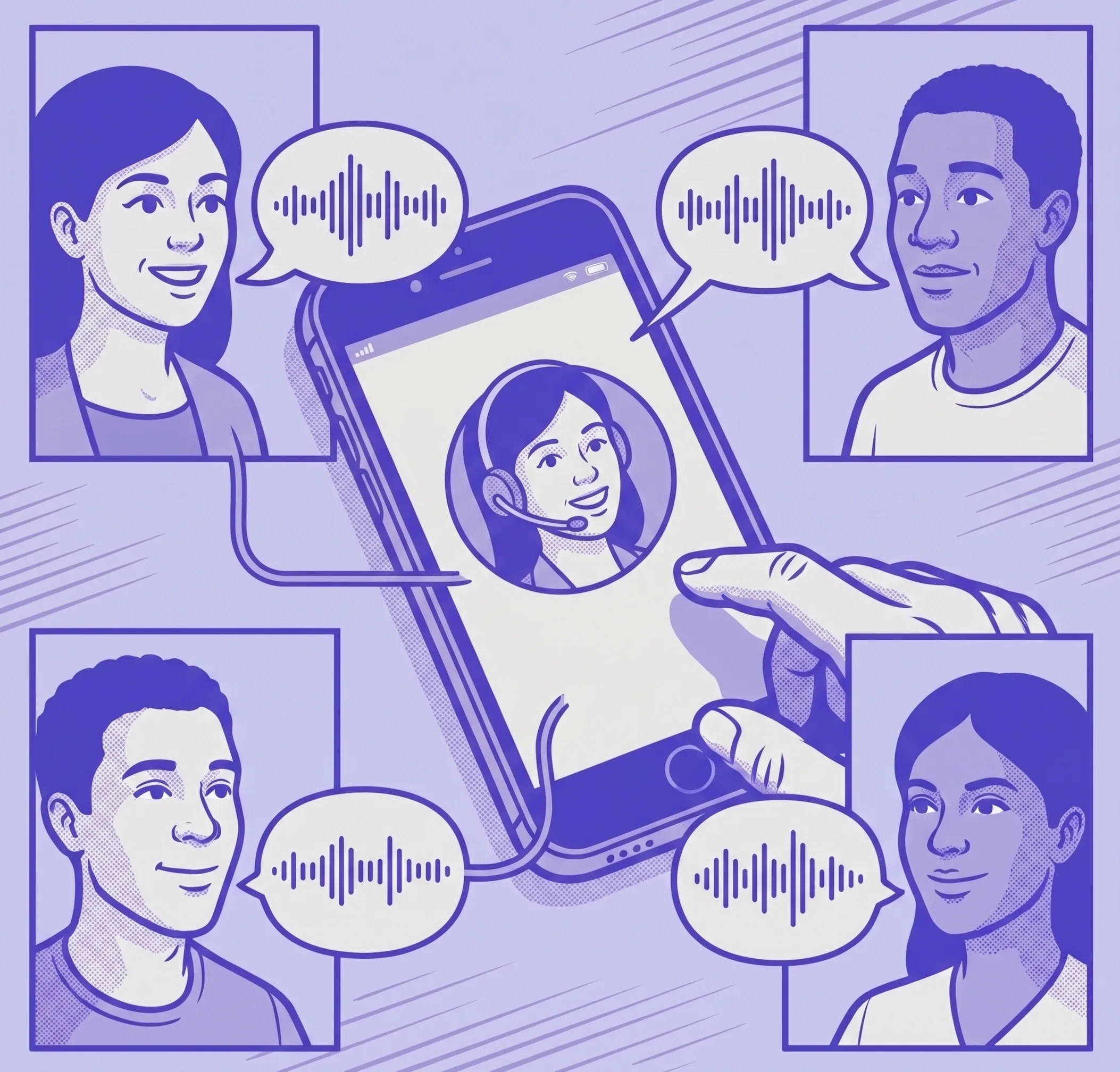
We analyzed 2,452 AI-handled conversations in healthcare facilities: what patients really ask, on which channels, and what it means for the front desk.
Read more